Pocket Fit Apple Watch Integration: Track Steps, Log Workouts, and Record Calories in Apple Fitness
Connect Pocket Fit with Apple Watch to track steps, log workouts, count calories, and record everything inside the Apple Fitness app.
Mar 3, 2026
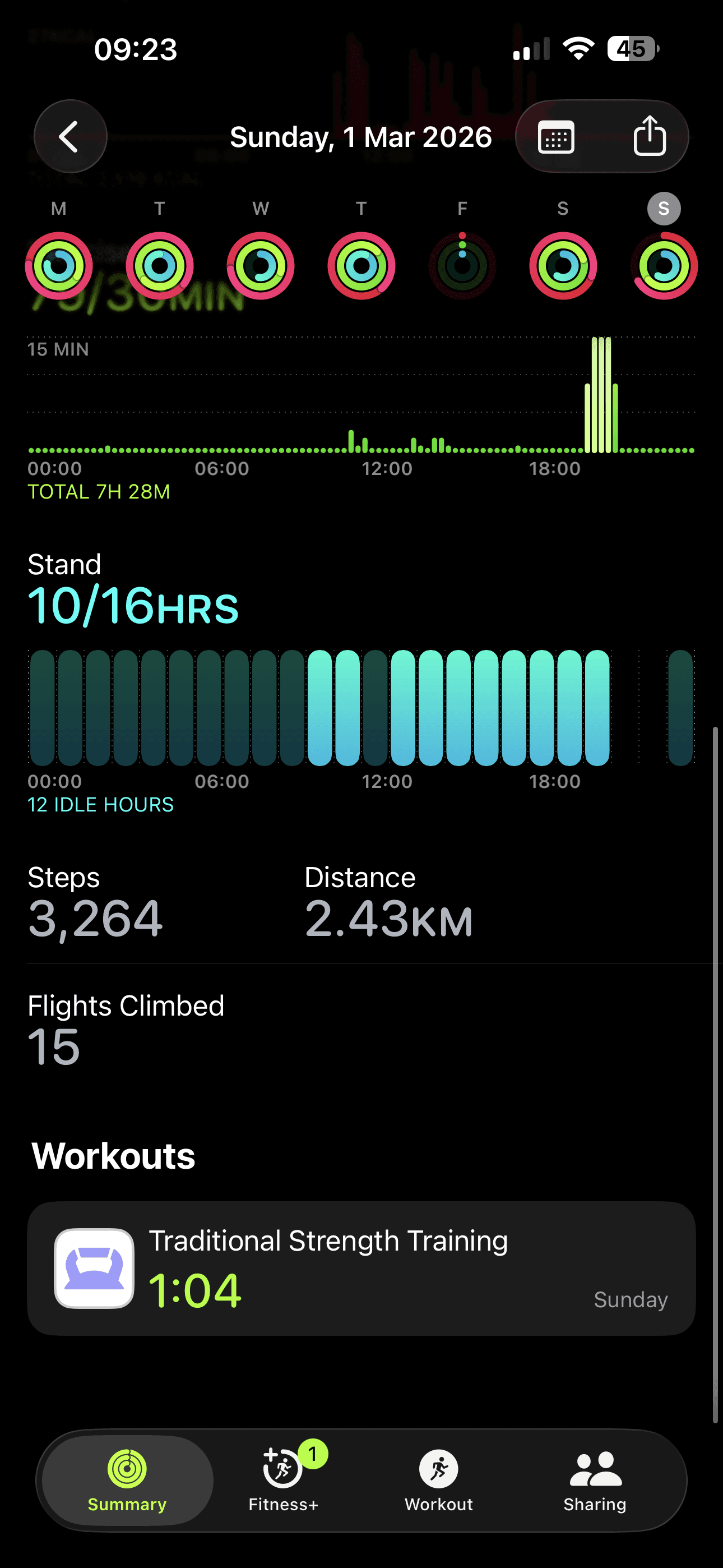
If you use Apple Watch, you already have great activity tracking - but your training plan and your Apple Fitness history don’t always line up. Pocket Fit’s Apple Watch integration closes that gap by letting you track steps, log workouts, count calories, and record the session inside Apple Fitness.
Pocket Fit is built around practical, personalized training plans and frictionless workout logging, so the Apple Watch experience is designed to support consistency, not add extra admin.
A training plan is only useful if you can actually follow it, measure it, and stay consistent week after week. Pocket Fit focuses on making plans personalized and adaptive, then making logging fast enough that you’ll do it even on busy days.
With Apple Watch integration, you can keep your daily movement (steps) and your structured training (workouts + calories) connected - so Apple Fitness reflects what you’re really doing.
Here’s what the integration enables in your day-to-day training flow:
Steps tracking: Your everyday activity contributes to the bigger picture of consistency and recovery.
Workout logging: You can log the workout you completed, keeping your progression and training history accurate.
Calorie counting: Your workouts include calorie estimates so effort is reflected in your Apple Fitness history.
Logged inside Apple Fitness: Sessions appear where you already review your activity, trends, and consistency.
Pocket Fit’s core promise is that your plan adapts to you (goals, constraints, real life) while keeping execution simple.
Follow your Pocket Fit planYou train using Pocket Fit’s personalized programming approach, designed to be practical and easy to stick to.
Log the workoutYou record what you actually did (your session details), so your plan stays grounded in reality and progression stays measurable.
Write it into Apple FitnessThe completed session (including active calorie estimate) is logged so it shows up in Apple Fitness alongside your other activity.
Apple’s Fitness app supports logging a workout with details like workout type, duration, start time, and active calories burned (estimated). Once logged, the workout appears in the Fitness app’s Sessions area within your Activity summary.
This matters because it keeps your “training record” in the same place you already check rings, trends, and consistency—without needing to reconcile multiple timelines.
Does Apple Fitness support adding active calories to logged workouts?Yes - when you log a workout in Apple’s Fitness app, you can include an estimate of active calories burned.
Where do logged workouts appear?Logged workouts show in the Fitness app under Sessions in your Activity summary.
What if I want to add a workout manually in Apple Fitness?Apple provides a manual logging flow inside Fitness (choose workout type, then add details like duration, start time, and active calories).
Explore expert insights, tutorials, and creative inspiration to take your videos to the next level.
View all
Mar 21, 2026
Train smarter with Pocket Fit
Download the app